
SpotCam Support Center
Can't find the answer? |
Submit a ticket |
How do I change the credit card for my subscription plan?
: 2022-08-01 14:11:02
 21462
214621
For security reason, if credit card number changed then it will be considered a new card, that's why we don't allow card number change in "Edit" function.
If you like to change the credit card for your subscription, all you need to do is subscribe again to the same service you are using and change credit card information during the process. You can follow below step by step process:
Step 1: Login to myspotcam.com and go to My Account page or go to My Account in mobile App

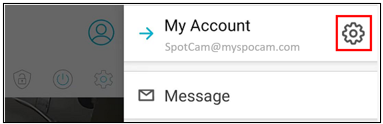
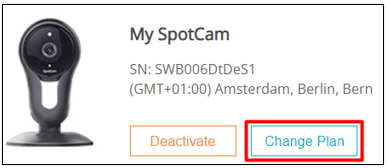
Step 2: Select the camera with the subscription for which credit card you like to change and then click “Change Plan”, then choose between NVR plan or AI service depends on your subscription
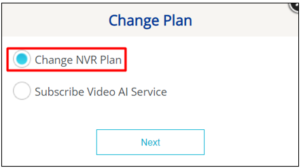
Step 3: Choose the plan here (choose the same plan if you only want to change credit card), and then click next

Step 4: Follow screen instructions and then click use a new card in this dialogue

Step 5: Input new credit card information and follows screen instruction to complete the process then it’s done
After above process, next time when the system charge for your subscription, it will be using the new credit card. Don’t worry, no duplicate charge will be made in any circumstances.
 English
 English (UK)
 日本語
日本語 繁中 (台灣)
 繁中 (香港)
 Deutsch
 Français
 Suomi
Suomi