
SpotCam Support Center
Can't find the answer? |
Submit a ticket |
Why my SpotCam live video freeze after watching for a while using SpotCam WebVMS®?
 31805
318053
To make sure we can provide optimized service and best system performance to all of our users, there are two limitations when you watching live video using SpotCam WebVMS®.
1. SpotCam live video display will stop after viewing continuously for 10 minutes
Live video will automatically stop and you will see a message pop-up as shown below. Please don’t worry, your SpotCam video recording is not influenced by this, it is still being recorded on the server without any video drop. To resume live video, simply click continue button in below pop-up window.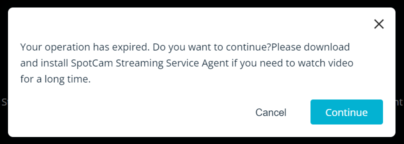
2. SpotCam live video display will stop after viewing more than 30 minutes within the hour
When this happens, you will see pop-up message as shown below, it means you’ve been watching live video for more than 40 minutes within the hour. You will have to wait till next hour to begin watch live video again. Again, please don’t worry, your SpotCam video recording is not influenced by this.
If you like to watch live video display without above limitations when using SpotCam WebVMS®, just visit here to download and install SpotCam Streaming Service Agent, then you will not be limited by above limitations anymore. To learn more about SpotCam Streaming Service Agent, please check this article out.
 English
 English (UK)
 日本語
日本語 繁中 (台灣)
 繁中 (香港)
 Deutsch
 Français
 Suomi
Suomi